Showing posts with label MOSS. Show all posts

Thursday, October 20, 2011

Size limitation in MOSS 2007

SharePoint Object's Size limitation in MOSS 2007  

SharePoint Object                                                     Limits   
Site collections in a web application                      50,000

Sites in a Site collection                                    250,000
Sub-sites nested under a Site                                2,000
Lists on a Site                                                     2,000
Items in a List                                              10,000,000
Items in View                                                      2,000
Field Type in a list                                                  256
Documents in a Library                                    2,000,000
Documents in a Folder                                           2,000
Maximum document file size              2GB (by default 50MB)
Documents in an Index                                   50,000,000
Search Scopes                                                     1,000
Search Scopes in a Site                                           200
User Profiles                                                   5,000,000
Template size                                   10,000,000 (default)


Happy SharePointing...!!

Wednesday, July 7, 2010

Remove search scopes from Search scopes Dropdown list using JQuery.

Easy to remove Search scopes from Out Of the Box Search Scope Drop down list using JQuery.
Use below JQuery for remove Scopes from Dropdown list.

$(document).ready(function(){
$(window).error(function(){
alert("Error");
});

$("select[id$='SBScopesDDL'] option:contains('Scope2')").remove();
$("select[id$='SBScopesDDL'] option:contains('This Site:')").remove();
});

Monday, June 28, 2010

Programmatically get SSP URL of Farm

Programmatically get SSP URL of Farm

If you are playing with farm than easily get Farm's SSP URL as per below code lines or Use below function.

public static string GetFarmSSPURL()
{
string url = string.Empty;
ServerContext sc = ServerContext.Default;
object ssp = sc.GetType().GetProperty("SharedResourceProvider",
BindingFlags.Instance | BindingFlags.NonPublic).GetValue(sc, null);
Guid sspGuid = (Guid)ssp.GetType().GetProperty("AdministrationSiteId").GetValue(ssp, null);
using (SPSite sspSite = new SPSite(sspGuid))
{
url = sspSite.WebApplication.GetResponseUri(SPUrlZone.Default).AbsoluteUri + "ssp/admin";
}
return url;
}

Monday, May 3, 2010

Problem with MOSSRadEditor base class in RadEditor for MOSS 4.5.6

Problem with MOSSRadEditor base class in RadEditor for MOSS 4.5.6

I tried to add MOSSRadEditor in sample WebPart so I downloaded ASP.NET RadEditor for MOSS Lite Edition from below free Telerik Control link.
http://www.telerik.com/community/free-products.aspx
As per MOSSRadEditor help file I got 3 dlls for WSP and add to my WebPart project but I can’t find MOSSRadEditor Constructor as below
MOSSRadEditor objMOSSRadEditor = new MOSSRadEditor(); //not define MOSSRadEditor Constructor


Error:
The type 'Telerik.SharePoint.MOSSRadEditor' has no constructors defined

Resolution: I googled this problem and found the problem reason (WSP contains light DLLs). So I got one Telerik Support link (http://www.telerik.com/community/forums/sharepoint-2007/full-featured-editor/problem-with-mossradeditor-base-class-in-radeditor-for-moss-4-5-6.aspx ).This link contains one Reference code which use FULL DLLs so I download this DLLs and use it in my WebPart code.

Result: Its working fine.

Advantage: MOSSRadEditor Support all Browsers like IE, Firefox, Safari etc (I tried for this 3 browser).

Happy Coding !!!

Thursday, April 22, 2010

Filter in List View using Query String

Filter in List View using Query String

It’s very easy to filter in built list view web part OR SPList in UI.
Below query string is filter list.
?FilterField1=[Internal Field Name]&FilterValue1=[Value of Filter Field]
For more understanding let’s take one example.
Here I created one sample List which contains Title, Date, City and Country Columns as per below.

Now I want to filter on Country Column so query string looks like
?FilterField1=Country&FilterValue1=USA
Happy Coding !!!

Tuesday, March 16, 2010

Windows SharePoint Services Search Service

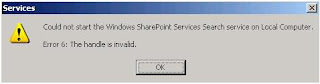
When you will try to start Windows SharePoint Search Service but not start it & fire below error.
"Could not Start Windows SharePoint Services Search Service on Local Computer."


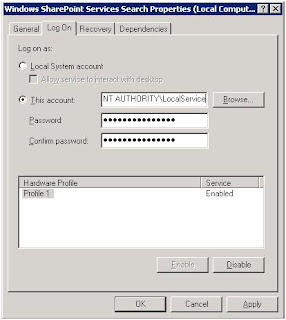
Modify the "Log On" Identity of the service as per below Image. In my machine, it was setup to log on as "Local Service". After changed this to "Local System", the service started without any errors.
Happy Programming with SharePoint !!!